
# Epoch 11: Final Octant v1 Allocation Window & Migration to v2
Epoch 11 is the last allocation window on Octant v1 (opens new window) and doubles as the migration period to Octant v2 (opens new window).
If you haven’t reviewed the v2 changes yet, please see the Octant v2 overview (opens new window) entry.
Important: There will be no more allocation windows on Octant v1 (opens new window). If you do not migrate, you will stop earning Individual Rewards on your locked GLM and cannot participate in future fund distributions.
# What’s different in Epoch 11 Allocation window
- Single donation recipient: Only Protocol Guild (opens new window) (the premier funding organization for Ethereum protocol development) will be available to donate to.
- No matching funds: Golem Foundation (opens new window) will not match donations in Epoch 11. (Matching funds are reserved for future v2 rounds.)
- Migration prompt: You’ll be asked to migrate your locked GLM from the v1 app (opens new window) to Octant app v2 (opens new window).
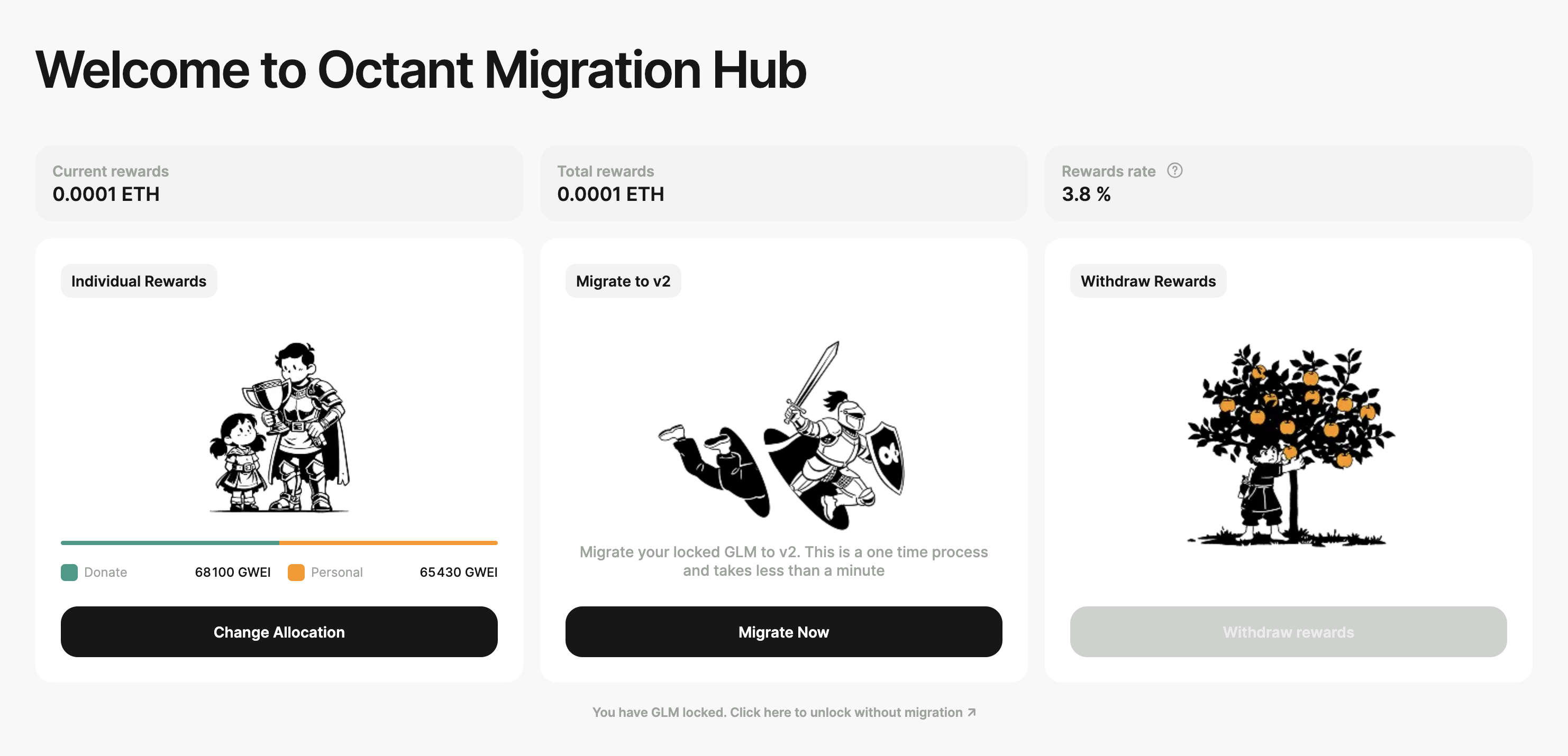
# Allocate
You choose how to split your available ETH rewards between Personal (keep) and Donated (to Protocol Guild):
- Open the allocation drawer by clicking on the Allocate button and use the slider to set your split.
- All the way right = donate all rewards.
- All the way left = keep all rewards.
- Somewhere in-between = keep some and donate some rewards.
- Click Confirm and sign the message in your wallet. Your allocation is now recorded.
The Epoch 11 allocation window will be open from February 18, 2026, 5:00 PM CET until March 4, 2026, 5:00 PM CET. You need to allocate within this timeframe - otherwise, you'll forfeit your rewards.
# Migrate
After you record your allocation, click Migrate to move your GLM from v1 to v2.
When: To maximize your v2 Individual Rewards, migrate before April 1.
How: Click on the Migrate Now button in the homepage. Migration is an on-chain process and involves three transactions:
- Unlock your GLM from the v1 contract.
- Set token allowance for the v2 locking contract.
- Lock your GLM in the v2 locking contract.
Your wallet will prompt you to confirm three actions, one after another. You must approve each one to complete the migration. Each transaction may take some time to confirm on-chain, so there can be short pauses where it looks like nothing is happening. Do not close the migration modal until all three steps are completed.
The new v2 GLM locking smart contract address is 0x7bee381d8ea5AE16459BcCD06ee5600bD0F1E86f (opens new window). Please make sure you’re locking your GLM to this address.
Terms: Before migrating, you must confirm acceptance of the Octant app v2 Terms of Service (opens new window) and Privacy Policy (opens new window).
Custody: Your v2 GLM lock is non-custodial. As in v1, you retain full control and can unlock any time or adjust (increase/decrease) your lock. Locking is required to earn Individual Rewards and to participate in v2 funding rounds run by Golem Foundation.
This method migrates all of your GLM from v1 to v2 in one transaction flow. If you’d prefer to test the new locking contract with a smaller amount first, click “You have GLM locked. Click here to unlock without migration” (below Migrate Now) and unlock your GLM from v1. Once your tokens are unlocked, go to https://glm.octant.app (opens new window), connect your wallet, set token allowance, and lock a test amount (minimum 100 GLM). After you confirm everything works as expected, you can lock the remaining balance.
Note: v2 opens Octant to other Capital Providers and their communities. Their participation rules may differ (e.g., different tokens to lock, allowlist-gated access). See the Octant App v2 documentation for details (opens new window).
Once the migration is complete, the app will display a success message with a link to the Octant v2 dashboard. Click it to browse your transactions and increase or decrease your lock.
Important: If you locked less than 100 GLM in Octant v1, you won’t be able to migrate using this method. To migrate smaller amounts, unlock your GLM back to your wallet, go to https://glm.octant.app (opens new window), and lock it there.
Please note: a minimum lock of 100 GLM is required to earn rewards and participate in Octant v2 allocation windows.
# Migrate funds locked in Sablier
If you participated in Octant community onboarding or won an Octant raffle, some of your GLM may be locked in a Sablier vesting stream.
In that case, the Octant app will display a link at the bottom of the Home view (below the Migrate Now box): “You still have GLM to claim - click here to withdraw”
To migrate to v2:
- Click the link.
- On https://app.sablier.com (opens new window), connect the same wallet you use with Octant.
- Click Vesting streams – View yours.
- Select your GLM stream.
- Withdraw your GLM from Sablier. (This is only possible for settled streams. If your stream hasn’t settled yet, wait until it does.)
- Go to https://glm.octant.app (opens new window) and lock your tokens there.
Note: Withdrawing from Sablier and locking in Octant v2 are on-chain actions and require gas fees.
# Unlock without migrating
If you want to unlock your GLM from Octant v1 without migrating to v2:
On the home page, below Migrate Now, click “You have GLM locked. Click here to unlock without migration.”
A modal will open. Follow the prompts to unlock GLM to your wallet.
Confirm the on-chain transaction in your wallet (gas fees apply).
Important: If you unlock without migrating, you will not earn rewards in v2 and cannot participate in v2 funding rounds. If you want to manually lock your GLM into v2, go to https://glm.octant.app (opens new window) connect your wallet and lock your tokens there.
# Withdraw
If you allocated any portion of your Individual Rewards to Personal, you can withdraw after the allocation window closes on March 4, 2026:
- Click Withdraw Rewards.
- Confirm the transaction in your wallet (on-chain; gas fees apply).
There is no deadline for withdrawals.
# What happens to Octant v1 after the Epoch 11 allocation window closes?
Octant v1 will be sunset. Golem Foundation (opens new window) will no longer run allocation windows on v1; all future rounds will take place on v2 (opens new window). Users who do not migrate will stop earning Individual Rewards and will not be able to participate in future distributions.
We will maintain a stripped-down Octant v1 app for the foreseeable future so that users can:
- Unlock GLM (for those who did not migrate during Epoch 11),
- Withdraw past rewards (if previously claimed but not withdrawn).
Effective after the window closes on March 4, 2026, v1 users have the following options:
- Unlock and migrate to v2,
- Unlock without migrating,
- Withdraw rewards (if any remain unwithdrawn from prior allocation windows).
Important: Locking GLM and earning rewards on v1 will no longer be possible after Epoch 11 ends.
Rewards on Octant v2 will begin accruing on April 1. To maximize your rewards, migrate all your GLM from v1 to v2 before that date.